Threat Hunting with Splunk — Real Use Cases & Queries (2026 Guide)
In 2026, attackers are sneakier than ever. They bypass antivirus, hide in legitimate processes, and dwell inside networks for weeks before being noticed. Waiting for alerts isn't enough anymore — you need to hunt them down proactively.
This is where Splunk shines. As the world's most popular SIEM, Splunk gives threat hunters the power to search billions of log events, correlate behaviors, and uncover hidden threats that traditional rules miss.
In this complete guide, you'll learn:
- What threat hunting actually means in 2026
- Why Splunk is the #1 SIEM for hunters
- The basics of SPL (Search Processing Language)
- 10+ real-world threat hunting use cases with queries
- How to map hunts to MITRE ATT&CK
- Tools and dashboards every hunter needs
- A complete hunting workflow you can follow today
Whether you're a SOC analyst, blue teamer, or aspiring threat hunter — this is your hands-on roadmap to mastering Splunk hunts in 2026. 🎯
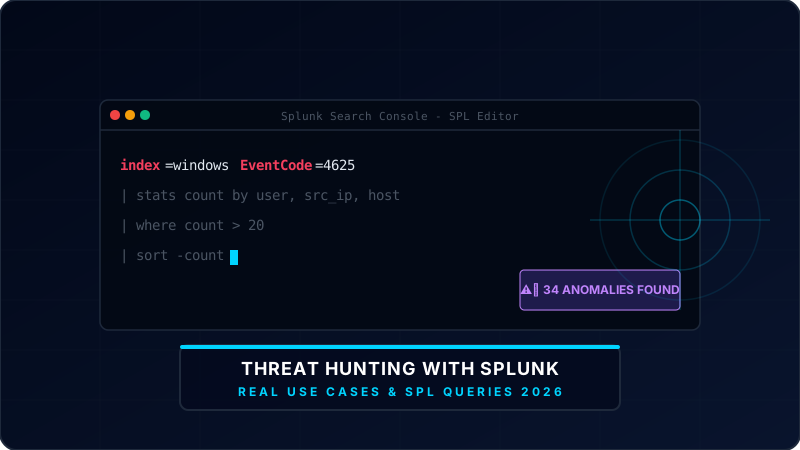
1. What is Threat Hunting?
Threat hunting is the proactive practice of searching through networks, endpoints, and datasets to detect malicious activity that has evaded existing security tools.
Unlike traditional alerting (which waits for known signatures), threat hunting is:
- 🔍 Hypothesis-driven — "What if attackers are using PowerShell to download payloads?"
- 🧠 Human-led — Skilled analysts asking smart questions
- 🎯 Proactive — Hunting before alerts fire
- 📊 Data-rich — Powered by SIEM data like Splunk
Why Threat Hunting Matters in 2026
- 🚨 Average dwell time of attackers: 204 days
- 🤖 AI-generated malware bypasses signatures daily
- 💰 Companies with threat hunting reduce breach costs by 40%
- 🛡 67% of organizations now have dedicated hunting programs
2. Why Splunk for Threat Hunting?
Splunk is the gold standard SIEM used by Fortune 500 companies, governments, and major SOCs worldwide.
Why Hunters Love Splunk:
- ⚡ Lightning-fast search across billions of logs
- 🧰 SPL (Search Processing Language) — highly flexible
- 📊 Beautiful dashboards and analytics tools
- 🎯 MITRE ATT&CK app integrated natively
Splunk vs Other SIEMs (2026)
| SIEM | Strength | Best For |
|---|---|---|
| Splunk | Powerful search, mature integrations | Enterprises, threat hunting teams |
| Microsoft Sentinel | Cloud-native, Copilot AI integrations | Azure-heavy cloud networks |
| Elastic Security | Open-source base, flexible indices | Cost-conscious operations |
| Wazuh | Free, lightweight endpoint agent | Small businesses |
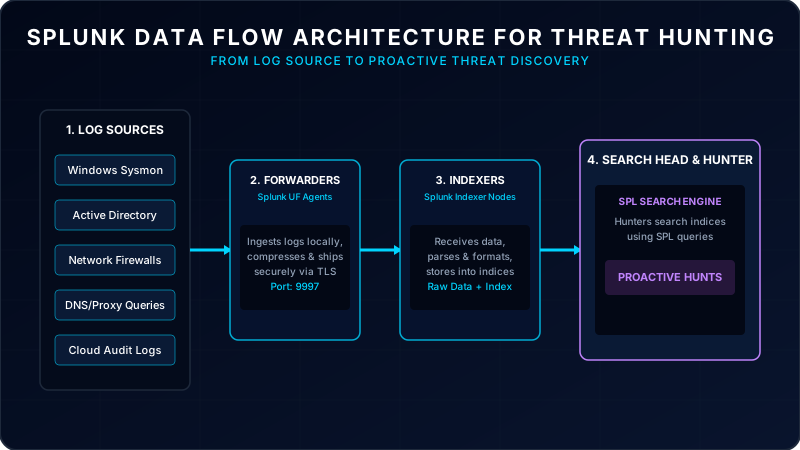
Splunk Ingestion Architecture
3. SPL Basics — Learn the Language of Hunting
SPL (Search Processing Language) is Splunk's query language. Master these basics first:
- Basic Search:
index=windows EventCode=4625(Finds failed Windows logons). - Filter with Fields:
index=windows EventCode=4625 user="admin" - Stats Command:
index=windows EventCode=4625 | stats count by user, src_ip(Aggregates count by dimensions). - Sort & Limit:
| sort -count | head 10 - Time Range:
earliest=-24h latest=now
✅ Master these basic commands and you can build 90% of your hunts.
4. The Threat Hunting Workflow (PEAK Framework)
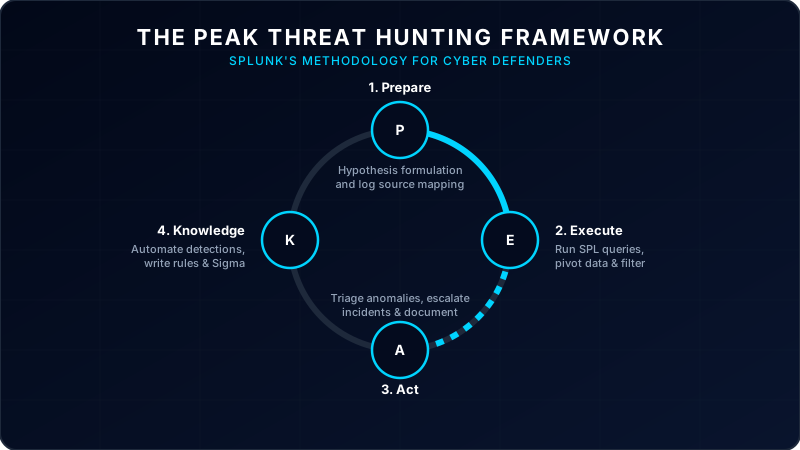
The PEAK framework (Splunk's official threat hunting methodology) gives hunters a clear process:
Define a hypothesis (e.g., "Attackers using WMI for lateral movement"), identify log sources, and map to MITRE IDs.
Build SPL queries, search indexed telemetry, filter noise, and correlate anomalies across datasets.
Validate findings, escalate validated threats to Incident Response, and document indicators of compromise.
Convert successful manual hunts into automated SIEM rules, write playbooks, and share logs with engineering.
5. Top 10 Real Threat Hunting Use Cases with Splunk Queries
Let's get hands-on. Here are 10 production-ready hunts with SPL code blocks.
🔍 Use Case #1: Detect PowerShell Encoded Commands
MITRE ATT&CK: T1059.001 — PowerShell
Why It Matters: Attackers use base64-encoded command lines to bypass signature detections.
index=windows source="WinEventLog:Microsoft-Windows-PowerShell/Operational" EventCode=4104
| search ScriptBlockText="*-EncodedCommand*" OR ScriptBlockText="*-enc *" OR ScriptBlockText="*FromBase64String*"
| table _time, host, user, ScriptBlockText
| sort -_time🔍 Use Case #2: Hunt for Brute Force Attacks
MITRE ATT&CK: T1110 — Brute Force
Why It Matters: Rapid failed logons indicate scanning or account password spraying.
index=windows EventCode=4625
| stats count by user, src_ip, host
| where count > 20
| sort -count🔍 Use Case #3: Detect Suspicious Parent-Child Process
MITRE ATT&CK: T1059 — Scripting Interpreter
Why It Matters: Office documents (Excel/Word) spawning PowerShell or Cmd is classic phishing behavior.
index=sysmon EventCode=1
| search (ParentImage="*winword.exe*" OR ParentImage="*excel.exe*" OR ParentImage="*outlook.exe*")
  AND (Image="*powershell.exe*" OR Image="*cmd.exe*" OR Image="*wscript.exe*")
| table _time, host, user, ParentImage, Image, CommandLine🔍 Use Case #4: Detect Mimikatz / Credential Dumping
MITRE ATT&CK: T1003.001 — LSASS Memory Access
Why It Matters: Attackers target LSASS memory to extract cleartext passwords or hashes.
index=sysmon EventCode=10
| search TargetImage="*lsass.exe*"
  AND (GrantedAccess="0x1010" OR GrantedAccess="0x1410" OR GrantedAccess="0x143A")
| table _time, host, SourceImage, TargetImage, GrantedAccess🔍 Use Case #5: Hunt for Lateral Movement via RDP
MITRE ATT&CK: T1021.001 — Remote Desktop Protocol
Why It Matters: Attackers hijack or compromise domain accounts to log in across network systems.
index=windows EventCode=4624 LogonType=10
| stats values(src_ip) AS source_ips, count by user, host
| where count > 3
| sort -count🔍 Use Case #6: Detect Suspicious DNS Tunneling
MITRE ATT&CK: T1071.004 — DNS Tunneling
Why It Matters: Malware encapsulates C2 commands or data inside DNS packets to bypass proxy filters.
index=dns
| eval query_length=len(query)
| where query_length > 50
| stats count by query, src_ip
| sort -count🔍 Use Case #7: Hunt for Scheduled Task Creation
MITRE ATT&CK: T1053.005 — Scheduled Task Persistence
Why It Matters: Attackers hide scripts in scheduled tasks to maintain reboot persistence.
index=windows EventCode=4698
| table _time, host, user, TaskName, TaskContent
| sort -_time🔍 Use Case #8: Detect Cobalt Strike Beaconing
MITRE ATT&CK: T1071.001 — Web Protocols
Why It Matters: Command & Control agents beacon home at highly regular statistical intervals.
index=firewall action=allowed
| bucket _time span=1m
| stats count by src_ip, dest_ip, _time
| eventstats avg(count) AS avg_count, stdev(count) AS stdev_count by src_ip, dest_ip
| where count > (avg_count + 2*stdev_count)🔍 Use Case #9: Detect Suspicious User-Agent Strings
MITRE ATT&CK: T1071.001 — Web Protocols
Why It Matters: Malware often exposes script requests (python-requests, Go HTTP client) in web headers.
index=proxy
| stats count by http_user_agent
| sort count
| head 20🔍 Use Case #10: Hunt for Newly Created Admin Accounts
MITRE ATT&CK: T1136.001 — Local Account creation
Why It Matters: Attackers establish backdoors by adding accounts to local Administrators groups.
index=windows (EventCode=4720 OR EventCode=4732)
| search TargetUserName="*admin*" OR GroupName="*Administrators*"
| table _time, host, SubjectUserName, TargetUserName, GroupName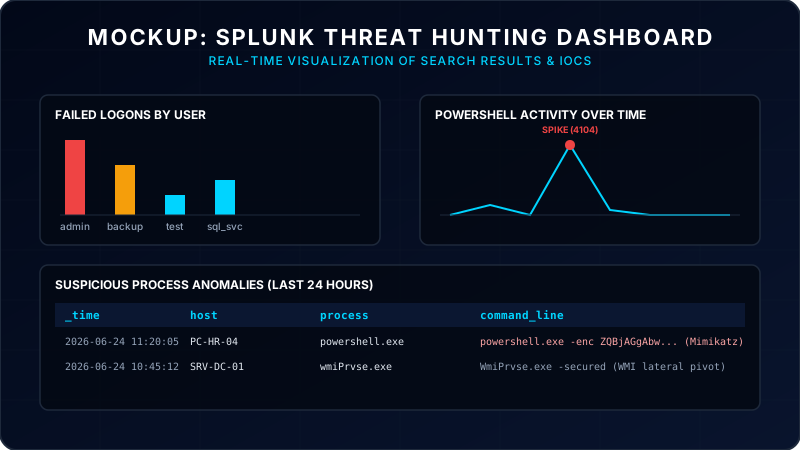
6. Mapping Splunk Hunts to MITRE ATT&CK
The Splunk ATT&CK Navigator app lets you tag every hunt with a MITRE ID and visualize coverage gaps.
How to Map Hunts:
- Open Splunkbase and install MITRE ATT&CK Navigator
- Tag each saved search with its technique ID (e.g., T1059.001)
- Generate coverage heatmaps to identify visibility blindspots
7. Must-Have Data Sources for Splunk Hunting
You can't hunt without the right logs. Ensure your Splunk Indexers are ingesting:
| Data Source | What It Catches |
|---|---|
| Sysmon (Event ID 1, 3, 11, 22) | Process spawning, network connections, file writes, DNS queries |
| Windows Event Logs | Authentication events (4624/4625), scheduled tasks, group additions |
| PowerShell Script Block Logging | Full script block script executions (Event Code 4104) |
| Firewall / Web Proxy Logs | Port scanning, C2 channels, data staging and exfiltration |
8. Top Splunk Apps for Threat Hunting (2026)
- 🎯 MITRE ATT&CK Navigator — Coverage heatmaps
- 📊 Splunk Security Essentials (SSE) — Pre-built hunts library
- 🧠 Splunk Machine Learning Toolkit — Outlier detection models
- 📡 TA-Sysmon & TA-Windows — Log normalization add-ons
9. Building Your First Hunt — Step by Step
Let's execute a real hunt using the PEAK framework:
1. Hypothesis: "Attackers are abusing WMI queries to perform host reconnaissance or lateral command execution."
2. Data Sources: Sysmon Event ID 1 (Process creation) tracking wmiprvse.exe.
3. Run SPL search:
index=sysmon EventCode=1 Image="*wmiprvse.exe*"
| search CommandLine="*Invoke-WmiMethod*" OR CommandLine="*wmic*" OR ParentImage="*wmiprvse.exe*"
| stats count by host, user, CommandLine
| sort -count10. Building a Splunk Home Lab (Free)
You don't need corporate budgets to learn Splunk:
- 🖥 **VirtualBox/VMware** — Host your virtual nodes
- 🐧 **Ubuntu Server** — Run Splunk Enterprise (Free Dev license allows 500MB/day)
- 📥 **Windows 10 VM** — Generate endpoint logs with Sysmon configured
- 🎯 **Atomic Red Team** — Run emulation scripts to generate actual telemetry logs
- 🧪 **BOTS Dataset (Boss of the SOC)** — Download Splunk's free CTF datasets to practice
11. Common Mistakes Splunk Hunters Make
- ❌ Running broad wildcard searches without time bounds (kills performance)
- ❌ Not utilizing base searches or summary indexes
- ❌ Ignoring parsing warnings or event data format mismatches
- ❌ Hunting without a validated hypothesis
- ❌ Failing to save successful manual hunts as permanent alerts
12. Pro Tips from Senior Splunk Hunters
- 🔥 Always set a time range: Never search "All Time". Limit to 7d or 24h.
- 🔥 Use `tstats` for speed: Accelerate your queries by searching data models.
- 🔥 Learn regex: Dynamic field extraction via `rex` is a superpower.
- 🔥 Document hypotheses: Keep a record of what worked and what didn't.
13. The Future of Threat Hunting with Splunk (2026 & Beyond)
As we progress through 2026, threat hunting is evolving with:
- 🚀 AI Assistant integration: Splunk AI generates SPL queries from natural language text prompts.
- 🚀 Federated Search: Search multi-cloud security log silos without moving telemetry raw bytes.
- 🚀 Real-time UEBA: Behavior profiling models detect baseline user deviations automatically.
Conclusion
Threat hunting with Splunk is one of the most valuable skills in cybersecurity today. While alerts catch the known, hunters catch the unknown — and that's what separates great SOCs from average ones.
Start small. One hunt per week. In 6 months, you'll think like an adversary and detect like a pro. 🎯
👉 Next Step: Read our MITRE ATT&CK Framework Explained to build queries, check out How to Become a SOC Analyst 2026 for defensive paths, and read Malware Analysis for Beginners 2026 to spot IOC triggers.
Frequently Asked Questions (FAQ)
About the Authors
Written by the Hackers in Threat Hunt Team. We are a collaborative force of certified ethical hackers (OSCP, eWPTX, PNPT) specializing in network penetration testing, application security audits, and threat emulation. Our goal is to secure enterprise infrastructure by hacking it first.